
Believe it or not plotter paper is the only type that can be used with a plotter machine and with certain software. It is a well known necessity to the success of various different design trades.
Plotter paper is a specialty paper that is used with printers that can print vector graphics. They are used with specialty software, primarily by people that design things. Such as architects, engineers and other trades that build things.
It has been used historically by people in the design industry to transfer their drawings to. Before the use of computers became widely available, it was used to hand draw designs.
It comes in many different sizes and textures, there are different weights and specifications that determine what type of machine it will be best used with.
One type that is used is Vellum paper. This is preferred for ink jet printing, because the blueprints are crisp and clear. It comes in a size that is suitable for blueprints at twenty four inches by one hundred and fifty feet. The roll weighs around eighteen pounds. This is a rather expensive because it is such high quality. This type of paper is usually reserved for the final printing of the plans or designs that are going to be shown to the client.
Gloss presentation paper is a form of plotter paper that is also used to display the final product. It is also favored for the clear lines that it produces. This does not work that well with ink jet printing, it is the preferred method for pen plotting, using a pen plotting machine. It is less expensive than Vellum paper.
Bond paper is the most commonly used type because it is less expensive than Vellum. As a matter of fact a good alternative to Vellum is translucent bond paper. This type is very versatile and can be used with both a pen plotter machine and an inkjet printer.
Most plotter paper is sold is rolls, although there is some that is sold in large flat sheets to work with the flat sheet design printers that have increased in popularity since their inception.
There are several types of plotter paper to choose from, each with its own set of benefits and drawbacks. This is meant to be used with laser plotters, which are a fairly common piece of industrial machinery.
Showing posts with label Photo Printing. Show all posts
Showing posts with label Photo Printing. Show all posts
Monday, March 17, 2014

Monday, March 10, 2014
Remanufactured Cartridges vs. Compatible Cartridges
Mainly there are 3 types of printer cartridges - OEM, Compatible and Remanufactured. One of the 1st cartridges to hit the market bearing brand names was the OEM ones. They are costly and standardized. But many customers want cartridges which are specially manufactured to meet certain requirements and exceed beyond the OEM ones. These are the compatible ones. They are customized to meet specific client needs and hence are not branded like Exxon, Canon etc. they are manufactured by third parties and not the actual manufacturers. They can either be 100% compatible or less. If the cartridge is 100% compatible, it will be able to function with any kind of printer. This means that 100% compatible cartridge is recognized by any printer and hence will function smoothly.
But if the cartridge is not 100% compatible cartridge, then some printers may not be able to recognize it and functioning might be hampered. That is the main problem with compatible cartridges and faced by many customers. Hence, they are not really the first choice by most people. Compatible cartridges are usually more expensive than either OEM or remanufactured ones. The main difference between compatible and remanufactured is that compatible is made by assembling new parts where as re manufactured is made by using the already serviced parts. Remanufactured cartridges uses already serviced parts but go through a battery of tests which ensures supreme quality! Remanufactured cartridges have a fantastic combination of price and quality. Just because it is cheaper, that does not mean they compromise on quality. Quality is supreme but at affordable prices - which is what is most attractive for all customers!
It is thus, essential to make a prudent choice between different cartridges, printers and toners. Remember they are the life line of your organization. You do not want your work to be hampered. Visit us at macroenter.com for more information and excellent customer service. Our experts will help you make the right decision. You are not alone, we are here for you!
But if the cartridge is not 100% compatible cartridge, then some printers may not be able to recognize it and functioning might be hampered. That is the main problem with compatible cartridges and faced by many customers. Hence, they are not really the first choice by most people. Compatible cartridges are usually more expensive than either OEM or remanufactured ones. The main difference between compatible and remanufactured is that compatible is made by assembling new parts where as re manufactured is made by using the already serviced parts. Remanufactured cartridges uses already serviced parts but go through a battery of tests which ensures supreme quality! Remanufactured cartridges have a fantastic combination of price and quality. Just because it is cheaper, that does not mean they compromise on quality. Quality is supreme but at affordable prices - which is what is most attractive for all customers!
It is thus, essential to make a prudent choice between different cartridges, printers and toners. Remember they are the life line of your organization. You do not want your work to be hampered. Visit us at macroenter.com for more information and excellent customer service. Our experts will help you make the right decision. You are not alone, we are here for you!
Tuesday, March 4, 2014
The Advantages of Using Polypropylene Vinyl Banners for Marketing Use
Every business wants to give their brand a supreme attention. Your brand recognition is not up to the mark and despite of spending lavishly on the marketing campaign. It is lacking the kind of publicity you want. May be there is just a minor point you are overlooking such as getting an attractive banner done for your products and services. Bingo. Ring the bell – this is it. No matter how efficient and brilliant the banner adverts. Is done, but if the look isn’t appealing it is doomed. People are not going to notice unless you put something worth watching.
Polypropylene vinyl banners are the best when it comes to marketing your brand. The banners prepared from polypropylene film rolls. Banners play a crucial role in building a brand and for the growth of the business. As the advertisement world is highly competitive, it requires a precise marketing strategy to present your brand/products and services. Banners are proved to be a great medium when it comes to reaching audiences.
Contrasting with the early days of marketing businesses and advertising agencies now a day uses polypropylene vinyl banners, as it is known to be the faster attractive means of marketing medium to promote the brand/products and services. In today’s gung ho age, businesses are looking for every opportunity to take hold of the attention of the customers and what could be better than having polypropylene vinyl banners.
The banners made from polypropylene film rolls can be used for outdoor as well as indoor use. The banners can be printed in different sizes depending on the marketing requirements of your brand. Whether you are promoting a special product, you are launching a special services, or just making awareness of people about your products and services the banners made from polypropylene prints effectively and provide a long lasting effect. The banners can be printed on the assortment of sizes if you wish to use in for the places like exhibitions, road shows, school parties, fashion shows, convention show etc.
Today professional printing companies are opting for these kinds of banners as it makes the printing easy and doesn’t take much of a hassle in printing them. Moreover, the banner looks very appealing with the minimalist effort. The primary reason behind its soaring popularity is these banners are durable, flexible and sturdy, hence no matter how bad weather is – it won’t hinder your marketing campaign.
Polypropylene vinyl banners are the best when it comes to marketing your brand. The banners prepared from polypropylene film rolls. Banners play a crucial role in building a brand and for the growth of the business. As the advertisement world is highly competitive, it requires a precise marketing strategy to present your brand/products and services. Banners are proved to be a great medium when it comes to reaching audiences.
Contrasting with the early days of marketing businesses and advertising agencies now a day uses polypropylene vinyl banners, as it is known to be the faster attractive means of marketing medium to promote the brand/products and services. In today’s gung ho age, businesses are looking for every opportunity to take hold of the attention of the customers and what could be better than having polypropylene vinyl banners.
The banners made from polypropylene film rolls can be used for outdoor as well as indoor use. The banners can be printed in different sizes depending on the marketing requirements of your brand. Whether you are promoting a special product, you are launching a special services, or just making awareness of people about your products and services the banners made from polypropylene prints effectively and provide a long lasting effect. The banners can be printed on the assortment of sizes if you wish to use in for the places like exhibitions, road shows, school parties, fashion shows, convention show etc.
Today professional printing companies are opting for these kinds of banners as it makes the printing easy and doesn’t take much of a hassle in printing them. Moreover, the banner looks very appealing with the minimalist effort. The primary reason behind its soaring popularity is these banners are durable, flexible and sturdy, hence no matter how bad weather is – it won’t hinder your marketing campaign.
Wednesday, February 19, 2014
Pen Plotter, History
Pen plotters print by shifting a pen or other device across
the face of a piece of paper. This signifies that plotters are vector graphics
apparatus, rather than raster graphics as with other printers. Pen plotters can
illustrate multifaceted line art, including text, but do so unhurriedly because
of the power-driven movement of the pens. They are time and again incapable of
capably creating a solid area of color, but can hatch vicinity by sketching a
number of close, standard lines.
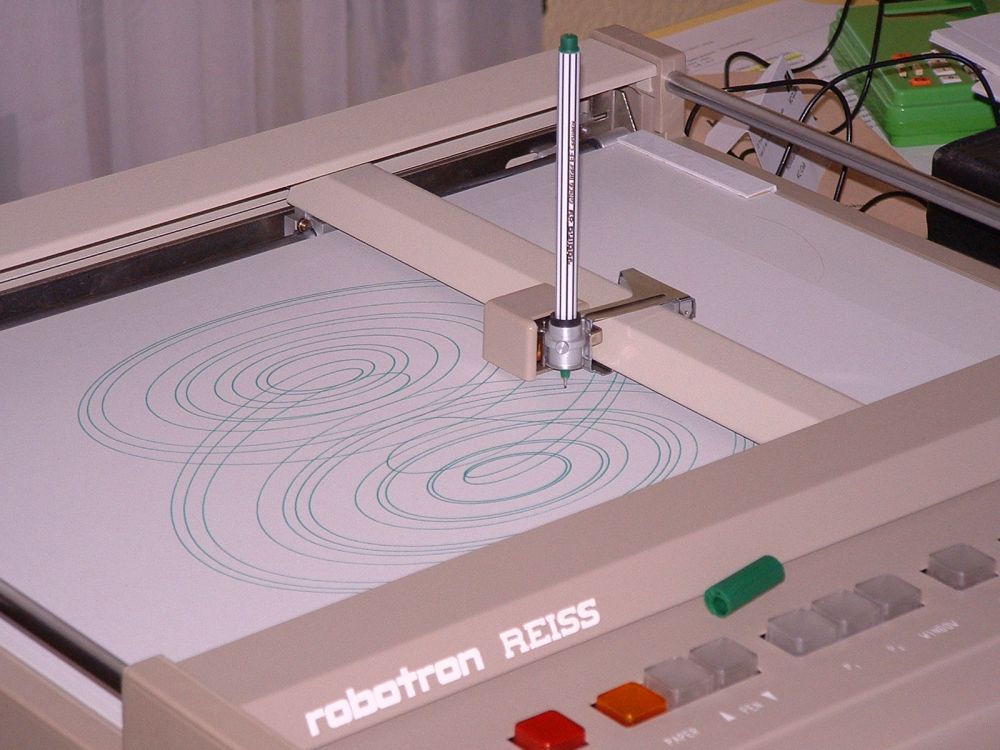
Plotters presented the fastest way to economically create
very large drawings or color high-resolution vector-based artwork when computer
memory was very high-priced and processor power was much regulated, and other
kind of printers had restricted graphic output capabilities.
Pen plotters have in essence become outdated, and have been
supplanted by large-format inkjet printers and LED toner based printers. Such
devices may still comprehend vector languages initially designed for plotter
use, since in many uses; they recommend a more economical alternative to raster
data.
Hewlett-Packard made its first acquirement in 1958 when it
acquired the F Mosley company from California. Mosley made graphics recorders
for implements. This industry subsequently became the San Diego Department
which made Hewlett-Packard’s pen plotters. In the 70’s, pen plotters were the
only way to get high-resolution hardcopy graphics production from computers.
The outcome of output from graphics printers normally varied between 70 dots
per inch and 100 dots per inch. But, even Hewlett-Packard’s first digital pen
plotters could create a line resolution equivalent to 1000 dpi. Until 1987, pen
plotters were also the lone cost-effective means of getting color output from
computers.
Put side by side to modern color inkjet and laser printers,
pen plotters were very time-consuming and unwieldy to use. Users had to
frequently worry about a pen running out of ink. If one pen ran dried out at
the end of a plot, the total plot had to be re-done. Hewlett-Packard plotters
were also restricted to a maximum of 8 dissimilar colors, without having to
alter pens in the halfway point of a plot. Lastly, plotters could only
illustrate lines and vectors; they couldn't duplicate raster or accurate
images. In spite of these limitations, the extreme resolution and color
capability of pen plotters made them the color hardcopy output device of choice
until the late 80’s. During this time, Hewlett-Packard benefit from a worldwide
market share of over 50%.
Plotters were a fine, while not spectacular, dealings for
Hewlett-Packard through the end of the 70’s. After that, the business expanded
quickly due to 3 factors. 1st, Hewlett-Packard introduced paper-moving plotters
to change the old flatbed technology. 2nd, Hewlett-Packard entered the outsized
-format plotter business which had beforehand been the domain of companies like
Calcomp and Versatec. 3rd, association of Hewlett-Packard pen plotters to non-
Hewlett-Packard systems developed dramatically. The link to non-
Hewlett-Packard systems was driven by use of business graphics on IBM and
well-matched Personal Computers.
These commodities were utilized at Hewlett-Packard’s San Diego Branch. Pen plotters were product line 30 for the section until the product lines were split up in 1989.
For more information, please visit: http://www.macroenter.com
Wednesday, February 12, 2014
Large-Format Printing: Suggestion and Guidelines
Printing with a large format printers can every now and then be tricky and complex. These guidelines and suggestion should help circumvent some probable problems.
Allow Plenty of Time. Large format printing takes a lot time Make time for the likelihood of a re-print.
- Margins. Set aside for the non-printable area in the margins. Limit design space is 41.6 inches on 42-inch paper. Failing to take into account the non-printable area can cause adverse results (uneven, clipping, scaling, and others).
- Stay away from Long Documents. If not your design center on the need for a sole long document, map your document as a progression of panels. Bigger files take long time to process. Long documents are more expensive to re-print. With panels, only the tricky panels will need to be reprinted. The longest we suggest for a solo panel is 60 inches (by 41.6 inches).
- Utilize a Scanner to Enlarge. If you have a flatbed scanner, you could widen an image by scanning it. This is perfect for enlarging old photographs or digital pictures that are too low resolution. If you are enlarging a digital pictures, print it out first at the extreme resolution and at the greatest size on first class paper, and then scan it. You now have a higher-resolution picture that you can print outsized than the original.
- Save PDF files in the PDF/X format. Storing files as PDF for printing assures the picture and font information will be put together within your file. Screening the PDF at 100% may illustrate some likely problems prior to printing such as mislaid or low resolution imagery.
- Photoshop. It is the most excellent application for editing pictures and performs mostly with pixels. A drawback with pixels is that the pixel based pictures is not to be scaled since all you are doing is enlarging the squares/pixels which lose attribute and clearness. If you are a web designer you will work very closely with Photoshop for numerous elements and graphics. Photoshop should not be used to produce text for print.
- Optimize Documents. Document size promptly impacts handing out time. Optimizing your document will result in faster printing.
- File Names. Employ folder names that exclusively identify your document. Adding up your own name, as piece of your folder name, is a fine place to begin.
- Bring Your File With You. In particular the first few times you print. Bringing your file with you when you come to print will permit us to address any possible trouble right away.
- Stay Close by For a Quick look. You are expected to pay for documents you request to print. After getting estimation, your document should commence printing, be available to scrutiny the document as it begin so you can call off if it is not printing as intended.
- The best method to attain a desired result is to go trial and error then improve the process for your own needs.
Allow Plenty of Time. Large format printing takes a lot time Make time for the likelihood of a re-print.
For more information about Large Format Photo Printing, please visit: http://www.macroenter.com
Saturday, February 8, 2014
Thermal Paper and Its Importance
 |
| Image: Alibaba |
The outside of the paper is coated with a solid-state combination of a dye and a suitable matrix; a fusion of a fluoran leuco dye type and octadecylphosphonic acid as an example. When the matrix is heat up above its melting point, the dye responds with the acid, change to its colored form, and the altered form is then conserved in a metastable state when the matrix solidifies back quickly enough. While on an open heat source, such as a fire, it can discolor the paper, a fingernail scratched quickly across the paper will also produce enough heat from friction to create a mark.
Most direct thermal papers need a protecting top-coating to:
Reduce attenuation of the thermal image caused by exposure to ultraviolet radiation/ultraviolet illumination/UV/actinic radiation/actinic ray light, water, oils, grease, lard, fats, and comparable causes…
- provide improved print head wear
- lessen or remove residue from the thermal coating on the thermal print heads
- provide higher anchorage of flexographic printing inks applied to the thermal paper
- Focus the warmth from the thermal print head on the active coating.
Thermal paper and thermal printers can be purchase at any of your favorite office supply stores or paper supply stores or you can also buy from the web to your favorite paper dealer. Top quality thermal paper printouts can last for years or even decades, unlike ordinary papers printed out. And it is because of the reasons why many people choose using thermal papers than a regular paper. Thermal paper is used extensively because it’s known for its swiftness, precision, top quality and it’s a price-effective product. If you’re running an eco-friendly business then you should ponder trying the recycle thermal paper.
It’s the most cost efficient paper any businessmen can use. At the same time, it creates a higher quality of result, accurate and fast. This type of paper is does not seep out, and is an almost error free product, since an ink is not needed to have a text or picture. With a thermal paper you can be certain that you have improved sight of what you wanted print out. These are only a few basis, quality and benefits that you can get out of thermal paper.
Some people say it’s pricey to buy a thermal paper rather than a bond paper. But the real deal you have to face is the thermal paper does not have to require an ink to print. Unlike with a regular bond paper that need an ink. And when you use thermal paper printer, it’s still quicker than a dot-matrix or inkjet printer, and it create less error plus it’s very easy to replace rolls. With these kinds of material, you’re problem free for a low outlay and can go on for a long haul.
Friday, February 7, 2014
Large Format Photo Printing - Helpful Tips Part 2
Hopefully the tips for Part One(1)
helped clear up some of the confusion and questions being tossed around
from people printing in wide format. Most of the issues with printing
large involve just setting up the equipment, system, and driver
properly. So without further ado, here is the part two (2) of my Large Format Photo Printing – Helpful Tips.

Every single one softwares, including PhotoShop and Qimage must work contained by the boundaries of the printer which are identified by the driver. If you have a specify and out of the question errand, another software might operate the demand in a different way. For instance, when you did not stipulate a borderless printing, the greatest extent size print permissible on 16×20 paper by means of the Epson 4800 is 15.766 x 19.333 inches.
When you attempt to print a 16×20 with PhotoShop, you will be informed that the print size is larger than authorized however you will be given a “Proceed” alternative. When you proceed, PhotoShop will print a 16×20 although it will clip the edges of the file and what you’ll end up with is a 15.766 x 19.333 inch turn out that has the edges gone. When you utilize Qimage, a pop up will inform you that the print size is bigger than one page and you will be enquired if you want a poster. When you give a negative response, you’ll have a 15.766 x 19.333 inch print (similar as PhotoShop) save for the edges being cropped off.
These are merely two dissimilar ways of managing the similar dilemma moreover in both case, the printer will have a 15.766 x 19.333 inch print: a printer/driver restriction. It is imperative to be familiar with how different programs operate sizing responsibilities and in particular, what comes to pass when you attempt to print sizes that does not match on the paper. No matter what printing software you bring into play. Be custom with how it operates sizing discrepancies.
A Qimage will almost always send more (potentially much more) data to the driver than PhotoShop or other printing programs due to Qimage’s interpolation procedure. At the same time, you have to make certain that the printer is arranged up correctly for large format photo printing. Not having the printer/spooler set-up as it should be may result in incomplete prints, no print at entirely, or failure due to the system not being capable to operate the amount of data being passed to the driver.
Initially, open the control panel, click “printers and faxes”, and then right click on the printer. Pick “Properties” from the right click menu then click the “Advanced” tab. If “Enable Advanced Printing Features” is checked at the bottom, Uncheck this specific choice. This is the reason for 98% of printing difficulty when printing large format as this feature can only handle a small amount of data and isn’t meant for photographic printing so the option should remain unchecked.
The former options on that tab as a rule make little difference but I recommend checking “Spool print documents so program finishes printing faster” and also “Start printing immediately”. Those alternatives will guarantee the best use of resources on the machine. Finally, click the “Print Processor” button and make sure that the right side is set to “RAW”. If any other data file is selected, it is probable that your photographic printing will not work properly. Click “OK” to save the changes.
Use the above table as a good rule of thumb for printing prints larger than 20×30 inches to circumvent system overload. Below 20×30 inches: just keep the interpolation levels set to “Max”. While there should be no problem printing at “Max” interpolation level in Qimage well beyond this arbitrary 20×30 size on a competent device, it will prolonged the process and will increase the strain on the entire system (particularly with respect to hard drive space).
Image: Foto Factory
Understanding software differences WRT sizing
Every single one softwares, including PhotoShop and Qimage must work contained by the boundaries of the printer which are identified by the driver. If you have a specify and out of the question errand, another software might operate the demand in a different way. For instance, when you did not stipulate a borderless printing, the greatest extent size print permissible on 16×20 paper by means of the Epson 4800 is 15.766 x 19.333 inches.
When you attempt to print a 16×20 with PhotoShop, you will be informed that the print size is larger than authorized however you will be given a “Proceed” alternative. When you proceed, PhotoShop will print a 16×20 although it will clip the edges of the file and what you’ll end up with is a 15.766 x 19.333 inch turn out that has the edges gone. When you utilize Qimage, a pop up will inform you that the print size is bigger than one page and you will be enquired if you want a poster. When you give a negative response, you’ll have a 15.766 x 19.333 inch print (similar as PhotoShop) save for the edges being cropped off.
These are merely two dissimilar ways of managing the similar dilemma moreover in both case, the printer will have a 15.766 x 19.333 inch print: a printer/driver restriction. It is imperative to be familiar with how different programs operate sizing responsibilities and in particular, what comes to pass when you attempt to print sizes that does not match on the paper. No matter what printing software you bring into play. Be custom with how it operates sizing discrepancies.
Spooling Options
A Qimage will almost always send more (potentially much more) data to the driver than PhotoShop or other printing programs due to Qimage’s interpolation procedure. At the same time, you have to make certain that the printer is arranged up correctly for large format photo printing. Not having the printer/spooler set-up as it should be may result in incomplete prints, no print at entirely, or failure due to the system not being capable to operate the amount of data being passed to the driver.
Initially, open the control panel, click “printers and faxes”, and then right click on the printer. Pick “Properties” from the right click menu then click the “Advanced” tab. If “Enable Advanced Printing Features” is checked at the bottom, Uncheck this specific choice. This is the reason for 98% of printing difficulty when printing large format as this feature can only handle a small amount of data and isn’t meant for photographic printing so the option should remain unchecked.
The former options on that tab as a rule make little difference but I recommend checking “Spool print documents so program finishes printing faster” and also “Start printing immediately”. Those alternatives will guarantee the best use of resources on the machine. Finally, click the “Print Processor” button and make sure that the right side is set to “RAW”. If any other data file is selected, it is probable that your photographic printing will not work properly. Click “OK” to save the changes.
Use the above table as a good rule of thumb for printing prints larger than 20×30 inches to circumvent system overload. Below 20×30 inches: just keep the interpolation levels set to “Max”. While there should be no problem printing at “Max” interpolation level in Qimage well beyond this arbitrary 20×30 size on a competent device, it will prolonged the process and will increase the strain on the entire system (particularly with respect to hard drive space).
Wednesday, February 5, 2014
Large Format Photo Printing – Helpful Tips Part 1
Large format pertains to any degree of imaging format from 4×5 inches
which is 102×127 mm or larger. The main service of a large format, a
film or anything digital, is a higher resolution. The higher resolution,
the better the details of a captured moment is, so it has better
quality photos. But large format photo printing can sometimes be unpredictable and tricky. So here are some tips that should be able to help avoid would-be problems.
 |
| Image by: Move Your Ass |
Subscribe to:
Posts (Atom)